

Blog

Sleek and Functional: The 2025 Buick Envision

White 2025 Buick Envision

Experience elegant design and uncompromising performance in the Buick Envision. Flowing lines and refined features give the Envision a head-turning presence on the road or in your driveway. With powerful efficiency and all-terrain capability, this versatile compact crossover offers outstanding multifunctionality to meet the demands of an active lifestyle. Discover a sleek and dynamic SUV curated for the modern driver in the 2025 Buick Envision.

Performance-Driven Engineering

The Buick Envision is engineered to produce a polished ride that soothes and exhilarates to suit your mood. The Envision is powered by a sophisticated 2.0L turbocharged ECOTEC 4-cylinder engine that produces a crisp 228 horsepower and 258 lb-ft of torque for responsive throttling you can feel. Equipped with standard all-wheel drive and an electronically controlled 9-speed automatic transmission, the Envision delivers confident performance on every drive.

Stylishly Modern

With its sleek silhouette, the Buick Envision is elegance in motion. This sporty SUV's front fascia features a distinctive grille with a striking horizontal bar design and unique checkmark LED headlights that enhance the Envision's elegant aesthetic. Active aero shutters close at high speeds to improve aerodynamic performance and close at lower speeds to cool the engine compartment.

Innovative Design

The Envision is a showcase for innovative Buick engineering that makes driving fun and rewarding. The Driver Shift Control feature provides responsive shifting when you're in the mood for a manual driving experience. Driver convenience technologies include keyless entry, push-button ignition, and a standard head-up display that projects driving and vehicle information onto the windshield at eye level.

Versatile Multitasker

When life presents challenges, the Buick Envision offers outstanding utility to get the job done right. The spacious trunk offers 25.20 cubic feet of cargo volume for transporting everyday items like groceries and luggage. When more space is needed, folding down the rear seats creates up to 52.70 cubic feet of cargo volume.

Technology-Rich Cabin

From daily commutes to grand family adventures, the Envision's tech-forward cabin allows you to enjoy premium entertainment on the road. The expansive 30" LCD houses a state-of-the-art infotainment system and driver information screen in a vibrant ultrawide format. For seamless connectivity, the Envision offers wireless Android and Apple smartphone compatibility and natural voice recognition.
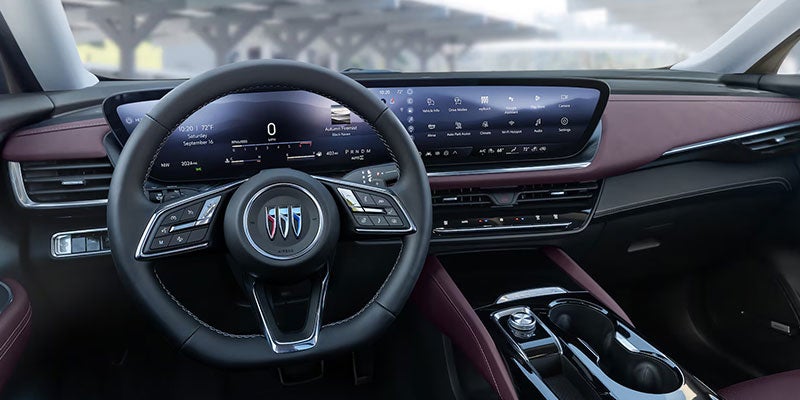
Technology features of the 2025 Buick Envision

Enhanced Safety

Advanced technologies throughout the Buick Envision actively survey driving conditions surrounding your SUV to keep you and your passengers safe. Standard safety features include adaptive cruise control, automatic emergency braking, blind zone monitoring, following distance indicator, forward collision alert, lane departure warning, pedestrian detection, and traffic sign recognition.

The Buick Envision is a vision of style and performance perfectly curated for the needs of the modern driver. To elevate the way you travel, visit us at Mike Young Buick GMC in Frankenmuth, MI, and test drive the Envision today.
Recommended Posts

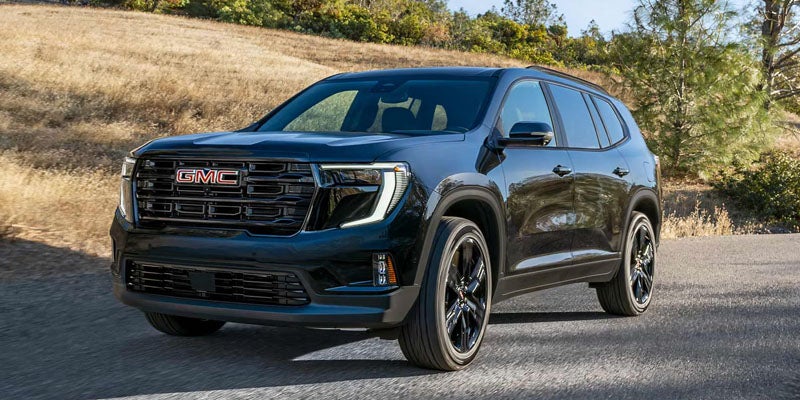
2026 GMC Acadia

Acadia or Enclave? Start With the Third Row

If you are deciding between a GMC Acadia and a Buick Enclave, picture a trip with every seat you need occupied. Who will sit in the third row? How often will they climb in and out? What still needs to fit behind them? Those questions make this three-row SUV comparison more useful than dimensions alone. Let the third-row passengers try the climb The Acadia offers seating for up to eight, depending on its configuration. That matters if you occasionally need the extra seat. Check the layout of the Acadia you are considering: a second-row bench changes the route to the back, while captain’s chairs provide space between the seats. Have your intended third-row passengers get in and out with the second row positioned for its regular occupants. The Enclave seats seven, with two second-row captain’s chairs and a three-person third-row bench. Try walking between the chairs, then try moving one forward. If you regularly use child seats in the second row, see how they affect access without moving a properly installed seat. The route that works for your family may differ from what looks convenient in a photo. Pack with every seat you plan to use Both SUVs have space behind the third row, but its usable shape matters as much as a cargo figure. GMC lists 23.0 cubic feet behind the upright third row of the 2026 Acadia. Bring the stroller, cooler, sports bags, or luggage you actually use. See whether they fit and whether the liftgate closes without shifting bags into a passenger’s space. Then fold one side of the third row. This shows what happens when a trip calls for both a rear passenger and a bulky item. Check how easily the seats fold on the specific trims you are shopping; power-folding features vary. Check the cabin from every seat On a family trip, small details become useful. Sit in each row and check the charging access, cupholders, air vents, and view out. Ask a third-row passenger to assess knee room with someone seated in front of them. The 2026 Acadia includes third-row USB-C charging ports. The 2026 Enclave offers an ultrawide display, while its Avenir trim adds heated second-row outboard seats. Check the equipment on each vehicle you consider, then decide which features your passengers will actually use. Finally, drive both SUVs over the same roads. Listen to cabin noise, try the controls, and see whether everyone remains comfortable once seated. If an eighth seat is essential, begin with an appropriately configured Acadia. If seven seats are enough, let the third-row trial and packed cargo area guide your GMC Acadia vs Buick Enclave decision. At Mike Young Buick GMC in Frankenmuth, you can browse Acadia inventory and explore available Enclave models. Bring your usual passengers and travel gear when you visit.

hid headlight

Are Your Headlights Getting Dim, or Is Something Else Wrong?

If the road ahead looks darker than it used to, check your Buick or GMC before the next nighttime drive. Dim headlights can make it harder to spot a turn, pedestrian, or obstacle. What you observe can help a technician find the cause, though it cannot confirm the repair on its own. Are the headlight lenses cloudy? With the vehicle parked and the lights off, look at both outer lenses in daylight. A yellowed, dull, or hazy surface may reduce the light reaching the road. Dirt and road film can also obscure a lens, so start with a gentle cleaning appropriate for the surface. If it still looks cloudy, ask a technician to check the lens and light output. Is one lamp out while the other works? Park safely, turn on the low beams, and check them from outside the vehicle. If one side stays dark, a failed lamp is possible. A fuse, connector, or wiring issue can look similar. Tell the service advisor which side is affected and whether its high beam or other lights still work. The lighting equipment varies by model, so an inspection should come before a parts recommendation. Do the lights flicker or change brightness? Notice whether the headlights pulse or change brightness when other electrical features are in use. Mention any trouble starting or charging-system warning, too. GMC lists dim headlamps among possible signs of alternator wear, but a technician may need to check the battery, connections, and lighting circuit to identify the cause. Check the basics before your next drive While safely parked, confirm that the low beams are on rather than relying on daytime running lights. Note whether the problem affects one side or both, happens every time, or comes with moisture inside a lamp. If the low beams do not provide enough visibility, address the issue before driving after dark; high beams are not a suitable substitute around other traffic. If you’ve noticed dim headlights on your Buick or GMC, share those details with Mike Young Buick GMC’s service team. You can schedule headlight service in Frankenmuth, MI so a technician can inspect the lenses, lamps, and electrical system.

GMC Front and Second Row Seating

GMC Heated Seat Not Working? What to Tell the Service Advisor

When a GMC heated seat stops warming up, a clear description helps the service team reproduce the problem. The same applies if a Buick heated seat is not working. Before your visit, note which seat is affected, what the controls do, and whether the problem changes between heat settings. Those details are more useful than guessing which part needs replacement. Which seat and which setting? Try the heated seat controls as directed in your owner’s manual, then make a quick note of what happens: One seat or both? Does the driver’s seat work while the passenger’s does not? If your vehicle has heated rear seats, are they affected too? One setting or every setting? Does the seat warm on high but seem cool on lower settings? Does the cushion warm while the seatback stays cool, if your model lets you distinguish between them? What do the controls show? Do the indicator lights or screen controls respond when pressed? Do they turn off unexpectedly? When does it happen? Is the issue consistent, intermittent, or limited to a cold morning or a remote start? Note whether the seat warms after you start the vehicle and select heat manually. Controls and available heating modes vary by model and year. Some GM vehicles can activate heated seats during remote start without lighting the seat button indicators. If the seat works with the in-vehicle control but not as expected during remote start, tell the advisor; a vehicle setting or normal remote-start behavior may be relevant. What can a technician check first? The technician can begin by confirming the concern on the affected seat and testing each available setting. Depending on the vehicle and symptoms, the next checks may include related settings and diagnostic information, electrical power and fuses, the switch or screen command, connectors and wiring, and the seat’s heating components. Comparing an affected seat with one that works can also help narrow down where to inspect. An illuminated button does not prove the heater itself is working. Likewise, a seat that fails to warm does not automatically need a new heating pad. Finding where the command or electrical power stops reaching the heater helps the service team recommend a specific repair. Avoid disconnecting wiring or removing trim beneath the seat yourself; other seat systems may be located there. If a seat becomes unusually hot, smells like it is burning, or has damaged upholstery, turn the heater off and tell the service team when arranging the visit. Make the appointment more useful Bring the vehicle’s year and model, a description of the affected seat and settings, and any photos or videos of a warning or unresponsive control. Mention whether other seat functions, such as power adjustment or ventilation, also act differently. If the issue comes and goes, say how often it happens and what you were doing when it last appeared. For GMC heated seat repair or a Buick seat-heater concern near Frankenmuth, contact the Mike Young Buick GMC service team. You can also schedule a service visit online and describe the symptoms so a technician can check the system before any parts are recommended.